

Core Concepts
Latitude organizes your work into a hierarchy of organizations and projects, with all reliability features scoped to the right level.Organizations
An organization is the top-level ownership boundary. It represents your team or company. Organizations own:- Members: Team members who can access the organization’s projects
- API keys: Used for programmatic access from your applications
- Settings: Organization-wide defaults, including monitoring behavior
Projects
A project is the main product boundary for reliability workflows. Each project typically corresponds to one agent, application, or feature you want to monitor.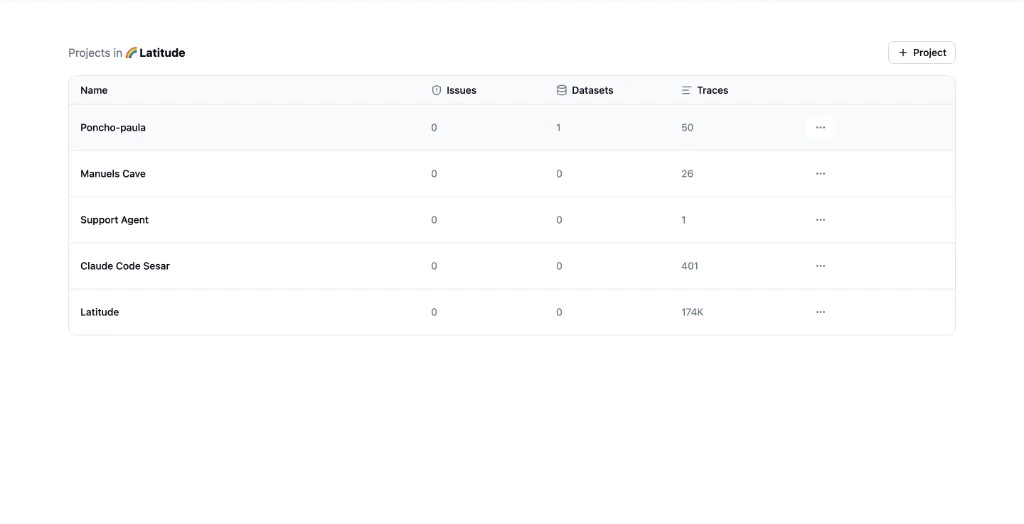
- Traces and sessions: Your agent’s captured interactions
- Evaluations: Automated monitoring scripts
- Issues: Discovered failure patterns
- Annotation queues: Human review workflows
- Simulations: Pre-ship test runs
- Scores: All verdicts from evaluations, annotations, and custom sources
Project Settings
Projects can override organization-level defaults:- Keep monitoring: Controls whether issue-linked evaluations stay active after an issue is resolved. When set at the project level, it overrides the organization default. When a user resolves an issue, this setting determines the default state of the “keep monitoring” toggle in the confirmation dialog.
How Settings Cascade
Settings resolve from the most specific scope to the broadest:- Project settings: Checked first
- Organization settings: Used as fallback when the project doesn’t override
keepMonitoring set to true, that applies regardless of the organization setting. If the project doesn’t set it, the organization default is used.
Access Model
- Web users authenticate through browser sessions with an active organization context
- API clients authenticate with API keys scoped to an organization
- Users without an active organization are routed to onboarding
Next Steps
- Developer Quick Start: Connect your first agent
- No-Code Quick Start: Explore the Latitude UI
- Observability: How telemetry flows into projects